
Environment:
- Case Manager 5.2.x / 5.3.x
- Content Navigator 2.0.3.x / 3.0.x
- Content Platform Engine 5.2.x / 5.5.x
- WebSphere Application Server 8.5.x / 9.0.x
Solution:
Performing the following steps:
- First of all, You must have Datetime property in Case Manager solution.
- Place a script adapter on the add case or work details page.
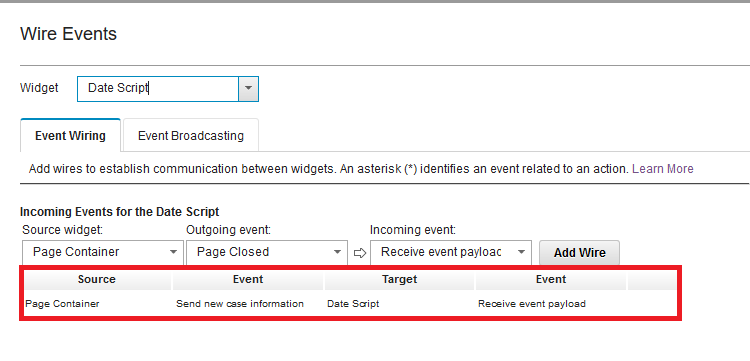
- Wire the Send New Case Info incoming event to script adapter as described below.
- Use the sample script code to load the default date in the property control.
require(["icm/model/properties/controller/ControllerManager"], function(ControllerManager) {
var collectionController = ControllerManager.bind(payload.caseEditable); var invDateController= collectionController.getPropertyController("ICMFieldDate"); currentDate = new Date();
invDateController.set("value",currentDate); pstate.set("value",pstatevalue); }); return payload;
- Save and close the page.
- Commit and deploy the solution.
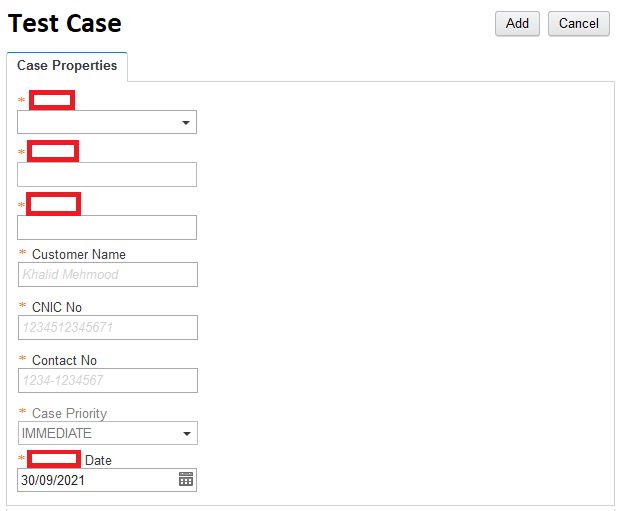
- Test the case by adding a new case type where you implement changes for auto populate date and time. After the page load, you will see datetime field is populated with current date/time.
 More details: https://www.ibm.com/support/pages/case-manager-how-auto-populate-datetime-field-case-page
0 Comments
Leave a Reply
Your email address will not be published. Required fields are marked *