Sometimes, it happens when WebSphere Application Server Admin forgets the wasadmin password. Question is, How can I change my primary administrator password using wsadmin in File Based Registry? Or, how to change wasadmin password in WebSphere?
Cause:
This can be caused by many reasons like, server will not start when security is enable, forgot administrative password etc.
Environment:
- IBM WebSphere Application Server (WAS) 7.0.x / 8.0.5.x / 9.0.x
- Content Platform Engine (CPE) 5.2.1.x / 5.5.x
- Content Navigator (ICN) 2.0.3.x / 3.0.x
Solution:
First Make sure all the other running services are stopped. Secondly, do the following steps accodingly to accomplish your requirement:
Start
wsadmin from your
WebSphere_root/profiles/profile_name/bin
- wsadmin -conntype NONE
- $AdminTask {listRegistryUsers}
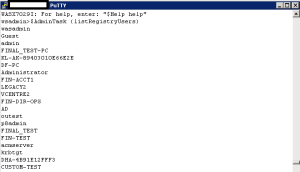
- $AdminTask changeFileRegistryAccountPassword {-userId primaryadminid -password newpassword}
- $AdminConfig save
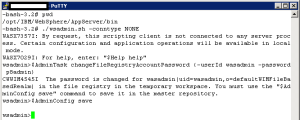
- Stop the application server.
- Clear the server cache
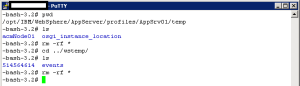
- Start the application server.
- Open WebSphere Application Server admin console and provide your username and password that you mentioned in the command to change. It will work fine.
For JYTHON:
Start wsadmin from your WebSphere_root/profiles/profile_name/bin
- wsadmin -lang jython -user primaryadminuser -password password
- AdminTask.changeFileRegistryAccountPassword('[-userId newAcct -password newPassword -uniqueName]')
- AdminConfig.save()
- Restart the application server
To further add a new user or how to change wasadmin password in websphere, please refere to the following tech notes:
- https://www.ibm.com/docs/en/was-nd/8.5.5?topic=wsadmin-fileregistrycommands-command-group-admintask-object
- https://www.ibm.com/mysupport/s/question/0D50z00005phvxOCAQ/how-can-i-change-my-primary-administrator-password-using-wsadmin-in-file-based-registry?language=en_US

0 Comments
Leave a Reply
Your email address will not be published. Required fields are marked *