
Requirement:
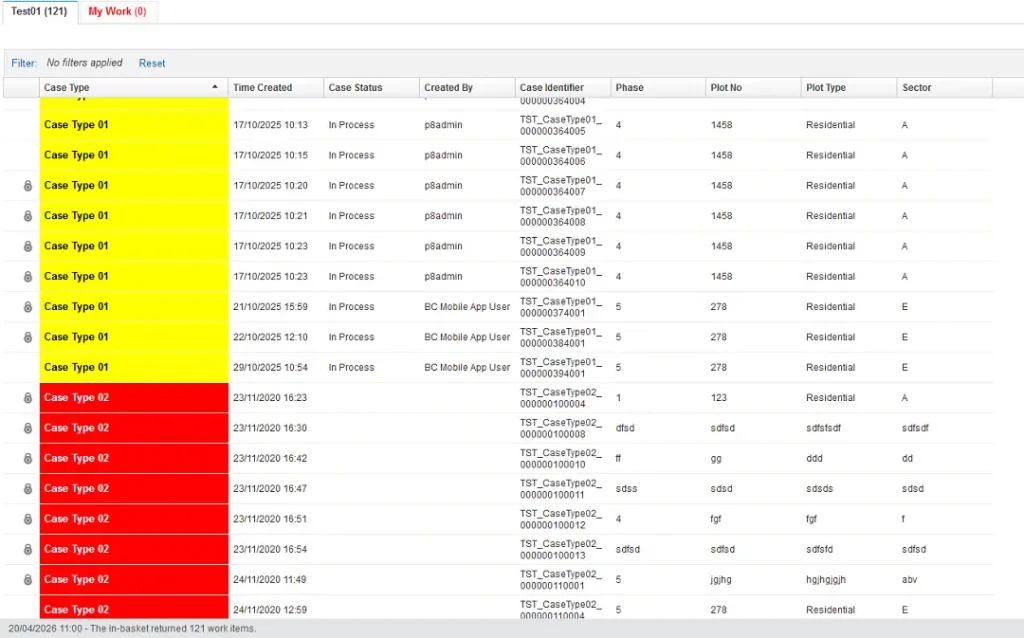
In IBM Case Manager 5.2.x / 5.3.x releases, user want to see the different colors of the Case Types so he can easily identify the priority cases. Basically, requirement is to customize the in-basket color style color. E.g. After logged into IBM Case Manager desktop, automatically color should be change of case types opn the basis of their names.
Solution:
To achieve this requirement, we cannot make conditions in the css, secondly we need to customize the in-basket column style color by using the customer in basket widget which needs obeviously development to further implement and test this case.
So, we can do this by simply using some javascript functionalities by inspecting the css class(s) in ICM. Below is the step by step instructions:
- Add a hidden script adaptor on the Solutions -> Work Page.
- Put the following code.
(function(){
setInterval(function(){
var cells = document.querySelectorAll(‘.gridxCell[colid=”2″]’);
for (var i = 0; i < cells.length; i++) {
var cell = cells[i];
var text = cell.textContent || cell.innerText;
text = text.replace(/^\s+|\s+$/g, ”);if (text === “Case Type 01”) {
cell.style.background = “yellow”;
cell.style.color = “black”;var links = cell.getElementsByTagName(“a”);
for (var j = 0; j < links.length; j++) {
links[j].style.background = “yellow”;
links[j].style.color = “black”;
links[j].style.display = “block”; // ensures full fill
}var spans = cell.getElementsByTagName(“span”);
for (var k = 0; k < spans.length; k++) {
spans[k].style.background = “yellow”;
spans[k].style.color = “black”;
}
}if (text === “Case Type 02”) {
cell.style.background = “red”;
cell.style.color = “white”;var links = cell.getElementsByTagName(“a”);
for (var j = 0; j < links.length; j++) {
links[j].style.background = “red”;
links[j].style.color = “white”;
links[j].style.display = “block”; // ensures full fill
}var spans = cell.getElementsByTagName(“span”);
for (var k = 0; k < spans.length; k++) {
spans[k].style.background = “red”;
spans[k].style.color = “white”;
}
}}
}, 1000);
})();
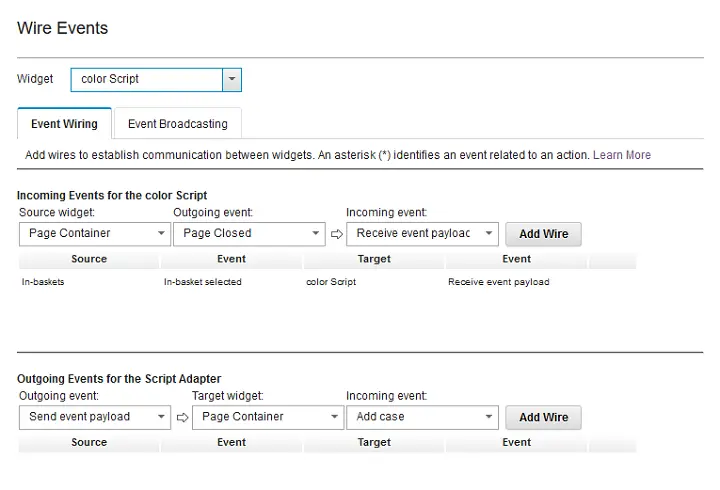
- Wire the script adaptor with incoming wiring to “In-Basket -> In-Basket Selected” as described in the below image:
- Save, commit, and deploy the solution. Once done, test the solution and you will see the results as mentioned in the below image:
Similarly, if you also want to change the particular In-Basket tab color, in case user is assigned to different baskets then also add the following code at the bottom of the script adaptor where you put the javascript earlier (as above):
(function(){
setInterval(function(){
var tabs = document.querySelectorAll(‘.inbasketTabLabel’);
for (var i = 0; i < tabs.length; i++) {
var tab = tabs[i];
var text = tab.textContent || tab.innerText;
text = text.replace(/^\s+|\s+$/g, ”);if (text === “My Work”) {
var tabContainer = tab.parentNode;
if (tabContainer) {
// tabContainer.style.background = “red”;
tabContainer.style.color = “red”;tab.style.color = “red”;
tab.style.fontWeight = “bold”;
}
}
}}, 800);
})();
Conclusion:
Finally, you can also change the color of a particular case type or in-basket tab by using the script adaptor. For More details, please visit: ibm support page.