
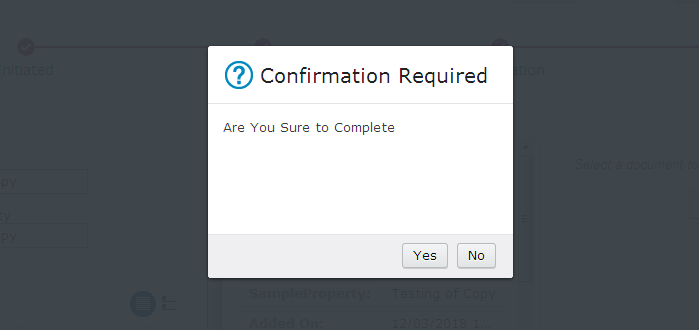
Validate response button in IBM ICM requirement on Work Details Page. Once user clicks on complete response name than a popup window will open and will ask for confirmation. In case of yes, work item will be dispatched/forwarded to next node and if selection is no work item remains open there and will not be dispatched. Do the following to achieve this requirement:
Validate Response Button in IBM ICM Steps:
- Add a hidden script adaptor on Work Details Page.
- Rename script adaptor according to yours, edit settings, and paste the following code
var coord = payload.coordination; var workitemEdit = payload.workItemEditable; var solution = this.solution; var prefix = solution.getPrefix(); var currentCase = workitemEdit.getCase(); var selectedResponse = workitemEdit.getSelectedResponse();
_self = this;
require(["icm/base/Constants", "icm/model/properties/controller/ControllerManager", "icm/model/properties/controller/types/AttachmentPropertyController","dojo/_base/lang","ecm/widget/dialog/ConfirmationDialog"], function(Constants, ControllerManager,AttPropCont,lang,Dialog){
if(coord){ coord.participate(Constants.CoordTopic.VALIDATE, function(context, complete, abort){
if(context[Constants.CoordContext.WKITEMRESPONSE] === "Complete" || context[Constants.CoordContext.WKITEMRESPONSE] === "Forward") { var dia = new Dialog({title: "Confirmation Required", cancelButtonLabel: "No", text: "Are You Sure to " +context[Constants.CoordContext.WKITEMRESPONSE], onExecute: function() { complete(); }, onCancel : function(){ abort({'silent':true}); } }); dia.show(); }else{
complete(); } }); } });
- Edit hidden script adaptor widget's wiring with Page Container's to Send work item.
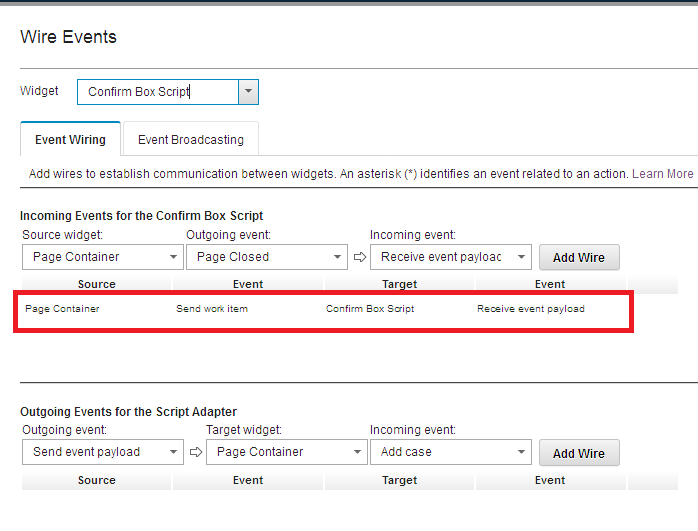
- Save and close widget settings, save and deploy solution. Test the solution. Validate response button in IBM ICM will work like below:
0 Comments
Leave a Reply
Your email address will not be published. Required fields are marked *