Open external web page in icm caen be achieved when there is a requirement where user needs to open an another application (webpage) either from some hyperlink or response. How one can get and display case properties in a new window in a printable format from Case Work Details Page. What is a best way to achieve that?
So, this requirement can be achieved by adding a script action button on Case Work Details Page.
- Add Script action button on Work Item Toolbar widget like,
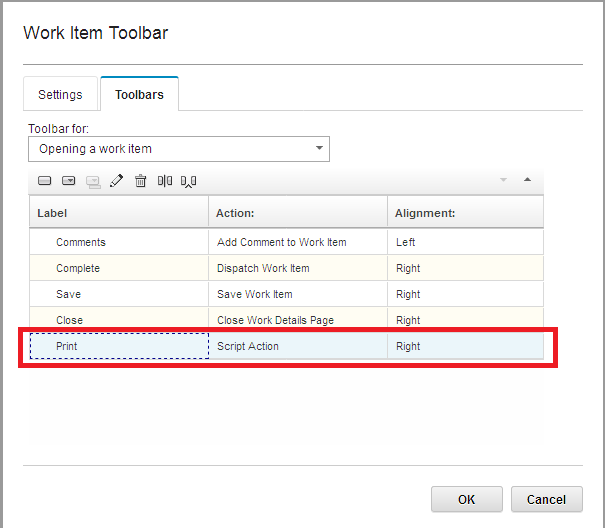
- Once done, edit the script action button to open external web page in icm, and add the below code (you need to change myCaseObj.attributes.propertyname according to yours) in the execute section:
var myCaseObj = this.getActionContext("Case")[0];var CaseID = myCaseObj.attributes.CmAcmCaseIdentifier;var SampleProp = myCaseObj.attributes.JNP_SampleProperty;var OtherProp = myCaseObj.attributes.JNP_OtherProperty;var CreatedBy = myCaseObj.attributes.Creator;var CaseType = myCaseObj.attributes.CmAcmCaseName;if(OtherProp === null)
{
OtherProp = "-";
}
function formatDate(date) {
var d = myCaseObj.attributes.DateCreated,
month = '' + (d.getMonth() + 1),
day = '' + d.getDate(),
year = d.getFullYear();
if (month.length < 2) month = '0' + month;
if (day.length < 2) day = '0' + day;
return [day, month, year].join('-');
}
function formatDateyear(date) {
var d = myCaseObj.attributes.DateCreated,
month = '' + (d.getMonth() + 1),
day = '' + d.getDate(),
year = d.getFullYear() +1;
if (month.length < 2) month = '0' + month;
if (day.length < 2) day = '0' + day;
return [day, month, year].join('-');
}
new_window = window.open("PrintReceipt.html");
// Changes Start for auto check
new_window.document.write('<head>');
new_window.document.write('<script>');
new_window.document.write('function opt1(){');
new_window.document.write(' var opt1_cus= document.getElementById("opt1_cus");');
new_window.document.write('if(opt1_cus.checked){opt1_off.checked = true;}');
new_window.document.write('else if(!opt1_cus.checked){opt1_off.checked = false;}');
new_window.document.write('} ');
new_window.document.write('function opt2(){');
new_window.document.write(' var opt2_cus= document.getElementById("opt2_cus");');
new_window.document.write('if(opt2_cus.checked){opt2_off.checked = true;}');
new_window.document.write('else if(!opt2_cus.checked){opt2_off.checked = false;}');
new_window.document.write('} ');
new_window.document.write('function opt3(){');
new_window.document.write(' var opt3_cus= document.getElementById("opt3_cus");');
new_window.document.write('if(opt3_cus.checked){opt3_off.checked = true;}');
new_window.document.write('else if(!opt3_cus.checked){opt3_off.checked = false;}');
new_window.document.write('} ');
new_window.document.write('function opt4(){');
new_window.document.write(' var opt4_cus= document.getElementById("opt4_cus");');
new_window.document.write('if(opt4_cus.checked){opt4_off.checked = true;}');
new_window.document.write('else if(!opt4_cus.checked){opt4_off.checked = false;}');
new_window.document.write('} ');
new_window.document.write('</script>');
new_window.document.write('</head>');
// Changed End for auto Check
new_window.document.write('<body>');
new_window.document.write('<table width=750 align="center" border="0" cellspacing="1" cellpadding="1">');
new_window.document.write('<tr>');
new_window.document.write('<td><img src="http://icmserver.ibm.com/images/logo.png" height="110" width="90"></td><td align="center"><font size = 5><br>Customer Care Services<br>PR Branch</br></font></td>');
new_window.document.write('</tr>');
new_window.document.write('<table width=750 align="center" border="0" cellspacing="1" cellpadding="1">');
new_window.document.write('<tr>');
new_window.document.write('<td>Date: '+ formatDate('d') +' </td><td align=right>Customer Copy</td>');
new_window.document.write('</tr>');
new_window.document.write('</table>');
new_window.document.write('<table width=750 align="center" border="1" cellspacing="1" cellpadding="1">');
new_window.document.write('<tr>');
new_window.document.write('<td>');
new_window.document.write('<table width=750 align="center" border="0" cellspacing="1" cellpadding="1">');
new_window.document.write('<tr>');
new_window.document.write('<td>Section: <b><u>Maint Branch</u></b></td>');
new_window.document.write('<td></td>');
new_window.document.write('<td>ID: '+CreatedBy+'</td>');
new_window.document.write('</tr>');
new_window.document.write('<tr>');
new_window.document.write('<td></td>');
new_window.document.write('</tr>');
new_window.document.write('<tr>');
new_window.document.write('<td>Request Type: <b><u>Test Case</u></b></td>');
new_window.document.write('</tr>');
new_window.document.write('</table>');
new_window.document.write('</table>');
new_window.document.write('<table width=750 align="center" border="1" cellspacing="1" cellpadding="1">');
new_window.document.write('<tr>');
new_window.document.write('<td>');
new_window.document.write('<table width=750 align="center" border="0" cellspacing="1" cellpadding="1">');
new_window.document.write('<tr>');
new_window.document.write('<td>Case ID:</td>');
new_window.document.write('<td>'+CaseID+'</td>');
new_window.document.write('<td>Sample Property</td>');
new_window.document.write('<td>'+SampleProp+'</td>');
new_window.document.write('<td>Other Property</td>');
new_window.document.write('<td>'+OtherProp+'</td>');
new_window.document.write('</tr>');
new_window.document.write('</table>');
new_window.document.write('</table>');
new_window.document.write('<table width=750 align="center" border="1" cellspacing="1" cellpadding="1">');
new_window.document.write('<tr>');
new_window.document.write('<td>');
new_window.document.write('<table width=750 border="0" cellspacing="1" cellpadding="1">');
new_window.document.write('<tr');
new_window.document.write('<td>List of Docs Attached</td>');
new_window.document.write('</tr>');
new_window.document.write('<tr');
new_window.document.write('<td></td>');
new_window.document.write('</tr>');
new_window.document.write('<tr');
new_window.document.write('<tr');
new_window.document.write('<td><ol><li><input type="checkbox" id="opt2_cus" checked="yes" onclick="opt2()">Document 1 is attached.</li></td>');
new_window.document.write('</tr>');
new_window.document.write('<tr');
new_window.document.write('<td><li><input type="checkbox" id="opt12_cus" checked="yes" onclick="opt12()">Document 2 is attached.</li></td>');
new_window.document.write('</tr>');
new_window.document.write('<tr');
new_window.document.write('<td><li><input type="checkbox" id="opt8_cus" checked="yes" onclick="opt8()">Document 3 is attached.</li></ol></td>');
new_window.document.write('</tr>');
new_window.document.write('</table>');
new_window.document.write('</td>');
new_window.document.write('</tr>');
new_window.document.write('</table>');
new_window.document.write('<table width=750 align="center" border="1" cellspacing="1" cellpadding="1">');
new_window.document.write('<tr>');
new_window.document.write('<td>');
new_window.document.write('<table width=750 border="0" cellspacing="1" cellpadding="1">');
new_window.document.write('<tr');
new_window.document.write('<td>Set of Instructions</td>');
new_window.document.write('</tr>');
new_window.document.write('<tr');
new_window.document.write('<td><ul><li>Nil.</li></ul></td>');
new_window.document.write('</tr>');
new_window.document.write('</table>');
new_window.document.write('</td>');
new_window.document.write('</tr>');
new_window.document.write('</table>');
new_window.document.write('<table width=750 align="center" border="0" cellspacing="1" cellpadding="1">');
new_window.document.write('<tr>');
new_window.document.write('<td>Due Date: <u>4 working days</u></td>');
new_window.document.write('</tr>');
new_window.document.write('<tr>');
new_window.document.write('<td align=right><b>Website:</b> http://iparagons.com</td>');
new_window.document.write('</tr>');
new_window.document.write('<tr>');
new_window.document.write('<td align=right><b>Email:</b> info@iparagons.com</td>');
new_window.document.write('</tr>');
new_window.document.write('<tr>');
new_window.document.write('<td align=right><b>UAN:</b> 111-342-547</td>');
new_window.document.write('</tr>');
new_window.document.write('<tr align=center>');
new_window.document.write('<td>This is computer generated slip and does not require any signature</td>');
new_window.document.write('</tr>');
new_window.document.write('<tr>');
new_window.document.write('<td></td>');
new_window.document.write('</tr>');
new_window.document.write('</table>');
-
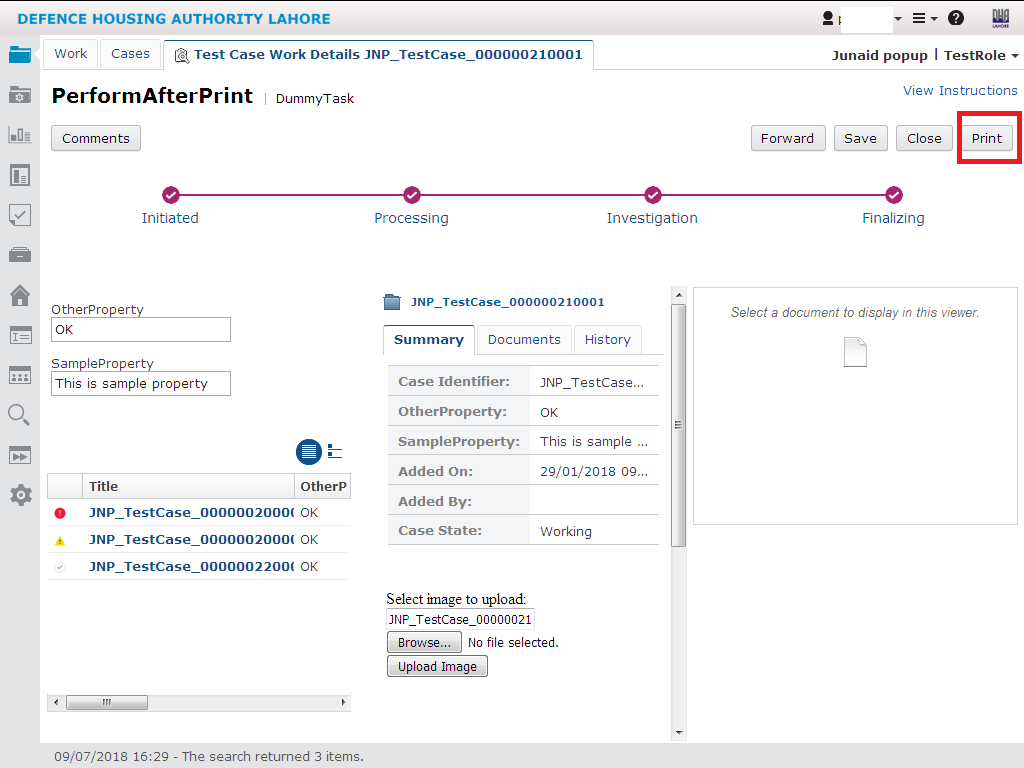
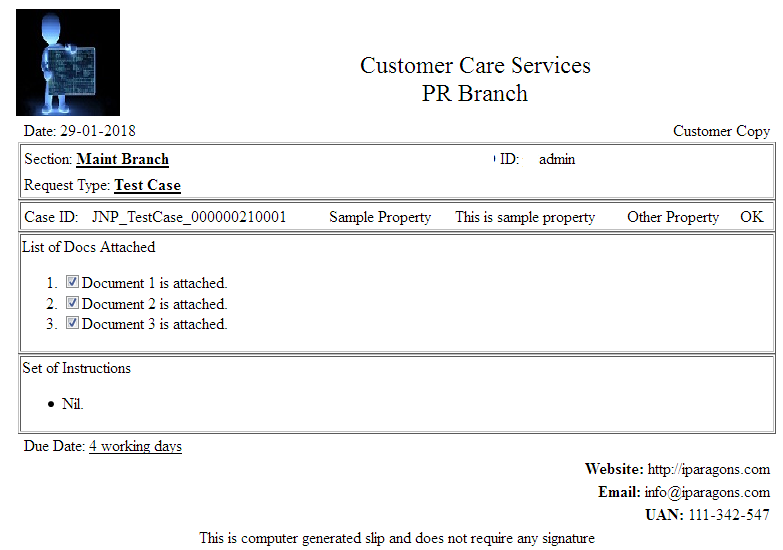
Save and close work item toolbar, deploy the solution. Open case from In-Basket, on work Details page there is a response name like Print (In our environment you can change its name if required). When you click on Script Action Button, a new window will be open where case properties will be displayed a below:

to ask. Does building a well-established blog such as yours require a massive amount work?
I am brand new to running a blog however I do write
in my diary on a daily basis. I'd like to start a blog so I will be able to share my personal experience and views online.
Please let me know if you have any recommendations or
tips for new aspiring blog owners. Appreciate it!